
Can I Use My Existing EE Digital Home Phone with Another VoIP Provider?
If you’re thinking about leaving EE Digital Home Phone or moving your landline number to another VoIP provider, you might be wondering aboutEE Digital Home Phone VoIP Compatibility.
The good news is that many phones currently used with EE Digital Home Phone will work with another VoIP provider, including Plexatalk. However, some EE and BT Digital Home Phone handsets are designed specifically for their own equipment and cannot be used in the same way.
The easiest way to find out is to check how your telephone currently connects.
Which EE Digital Home Phones Can Be Reused?
There are three common ways customers connect their home telephones to EE Digital Home Phone.
1. Your Telephone Plugs Into the Back of Your EE Router
Yes, you can usually keep using this telephone.
If your existing telephone has a traditional telephone cable that plugs into the phone socket on the back of your EE Smart Hub, it’s likely to be a standard analogue telephone.
This includes many traditional corded telephones and cordless DECT phone systems from manufacturers such as BT, Panasonic and Gigaset.
Although you’re currently making calls through EE’s digital phone service, the telephone itself doesn’t necessarily belong to any particular provider.
To use it with Plexatalk, you would simply connect the telephone to a compatible VoIP adapter instead of the EE router’s telephone socket.
The adapter connects to your broadband router and allows your existing phone to make and receive calls through Plexatalk.
2. Your Telephone Plugs Into an EE or BT Digital Home Phone Adapter
Yes, the telephone itself will usually work with another VoIP provider.
EE and BT provide Digital Home Phone Adapters that plug into an electrical socket and communicate wirelessly with a compatible Smart Hub.
These adapters allow customers to continue using traditional telephones without running a telephone cable directly to their broadband router.
If your telephone has a standard BT-style telephone plug connected to one of these adapters, there’s a good chance you can continue using it with Plexatalk.
However, there’s an important distinction.
You can usually reuse the telephone, but not the EE or BT Digital Home Phone Adapter.
The adapter is designed to communicate with compatible EE or BT equipment. It isn’t a universal VoIP adapter that can simply be configured with another provider’s details.
Instead, you would disconnect your existing telephone from the EE adapter and connect it to a VoIP adapter supplied or supported by your new provider.
With Plexatalk, we can supply a preconfigured adapter to make this straightforward.
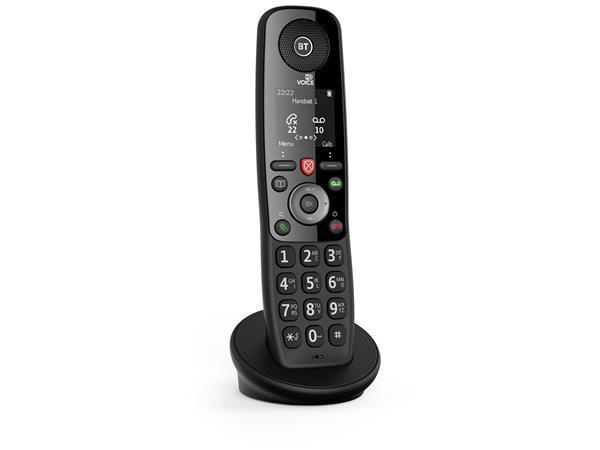
3. Your EE or BT Digital Home Phone Connects Directly to the Router Wirelessly
Unfortunately, these handsets generally cannot be reused with Plexatalk.
Some EE and BT Digital Home Phone handsets connect wirelessly to a compatible Smart Hub without using a traditional telephone cable.
Unlike ordinary cordless telephones, which communicate with their own base station, these handsets use the hub’s built-in cordless phone functionality.
They’re designed to work with the BT and EE Digital Voice system rather than being universal VoIP telephones.
If your handset only sits in a charging cradle and connects directly to your EE router, with no separate telephone cable or conventional base station, it’s likely to be one of these dedicated models.
In this situation, you would normally need a replacement telephone to use an independent VoIP service.
Fortunately, you don’t need an expensive specialist phone. Most standard home telephones can be used with Plexatalk when connected through a suitable VoIP adapter.
How Can I Tell Which Type of Telephone I Have?
If you’re unsure which type of telephone you’re using, there’s a simple way to check.
Look for the telephone cable.
- Telephone cable connected to your router: Your phone can usually be reused with a VoIP adapter.
- Telephone cable connected to an EE or BT wall-plug adapter: Your phone can usually be reused, but the adapter needs replacing.
- Cordless phone with its own base station connected by a telephone cable: Your existing cordless system can usually be reused.
- EE or BT Digital Home Phone connected directly to the Smart Hub wirelessly: You’ll normally need a different telephone.
One important point: a charging cradle isn’t necessarily the same as a telephone base station. Some dedicated Digital Home Phone handsets have a cradle that provides power only, with the handset communicating directly with the router.
If you’re still unsure, checking the model number or how the handset is connected can help establish compatibility.
Can I Keep My EE Landline Number as Well?
Yes. In most cases, you can transfer your existing EE landline number to an independent VoIP provider such as Plexatalk.
This process is known as number porting.
Once the transfer is complete, people can continue calling your existing landline number, but the calls will be handled by your new provider instead of EE.
You can usually keep your current broadband connection too, although it’s important to check how your EE broadband and phone services are packaged.
Don’t cancel your existing EE phone service before arranging the number transfer. Doing so could complicate the process or put your number at risk.
For more information, read our guide to EE Digital Home Phone vs independent VoIP.
How Do I Use My Existing Telephone with Plexatalk?
If your existing telephone is compatible, getting started is straightforward.
Plexatalk can supply a preconfigured VoIP adapter, allowing you to connect an ordinary home telephone to your broadband connection.
The setup is simple:
- Connect the VoIP adapter to your broadband router using an Ethernet cable.
- Connect your existing telephone or cordless phone base station to the adapter.
- Connect the adapter to power.
Once your service is active and the adapter is connected, you can make and receive calls using your familiar home telephone.
You won’t normally need to replace your cordless handsets, change your existing telephone system or learn how to use a completely different device.
You can also read our guide to VoIP adapters for more information.
Can I Stay with EE Broadband and Use Plexatalk for My Home Phone?
Yes. You don’t necessarily need to change your broadband provider to change your landline provider.
Plexatalk works over an existing suitable broadband connection, including EE broadband.
This means you can continue using EE for your internet connection while using Plexatalk separately for your home telephone service.
You would normally connect your telephone through a Plexatalk VoIP adapter rather than the telephone socket on your EE router.
Like other broadband-based telephone services, VoIP requires working internet and power to make calls, including emergency calls.
EE Digital Home Phone VoIP Compatibility – Still Unsure Whether Your EE Home Phone Will Work?
If you’re considering moving from EE Digital Home Phone to Plexatalk but aren’t sure whether your existing telephone is compatible, we’re happy to help.
Tell us the make and model of your telephone, or explain how it currently connects to your EE router.
We can help establish whether you can continue using your existing phone or whether you’ll need a replacement.
With Plexatalk, you can usually keep your existing landline number, continue using compatible home telephones and enjoy a phone service that isn’t tied to your broadband provider.