
You don’t have to lose your landline number when the UK retires the old copper phone network in January 2027. By switching to VoIP (Voice over Internet Protocol), you can:
👉 For home users: View VoIP for Home plans & sign up online
👉 For businesses: Check our business pricing or get in touch with us to get started.
From January 2027, the UK’s traditional analogue landline network—the Public Switched Telephone Network (PSTN)—will be switched off as part of a nationwide upgrade led by Openreach and BT. This means that landline calls will no longer run over copper wires, but instead through digital connections.
If you’re worried about losing your landline number, don’t be. Ofcom, the UK’s communications regulator, has confirmed that customers will be able to keep their existing numbers. The change is about technology, not identity—your familiar phone number can stay exactly the same.
The solution is VoIP (Voice over Internet Protocol), sometimes called “Digital Voice.” Instead of relying on outdated copper lines, your calls will run over your broadband connection. In practice, this means your landline will work much as it always has—just through a modern, more reliable system designed for the future.

The UK’s Public Switched Telephone Network (PSTN)—the traditional copper-wire system that has powered landlines for decades—is being retired. By January 2027, all PSTN and ISDN services will be switched off nationwide. This means every landline user, whether at home or in business, will need to move to a digital alternative.
The important thing to remember is this: you don’t have to lose your landline number. The switch-off is about technology, not identity. With VoIP services from Plexatalk, your number is preserved and your calls are delivered over your broadband.
We offer VoIP plans for both homes and businesses, so whether you’re a family who wants to keep a familiar landline or a business that needs a future-proof phone system, Plexatalk ensures a smooth, reliable transition away from PSTN.
VoIP (Voice over Internet Protocol) is the digital replacement for traditional landlines. Instead of sending your calls down old copper wires, VoIP uses your broadband connection to make and receive calls. From the user’s point of view, it still feels like a landline—you can keep the same number, use your existing handset (with a simple adapter), and make calls as normal. The difference is what happens in the background: your voice is converted into data and carried over the internet rather than analogue lines.
With the PSTN switch-off approaching in 2027, VoIP isn’t just an upgrade—it’s a necessity. It ensures you can keep your landline number, access more features for less cost, and stay ready for the digital future. For both households and businesses, Plexatalk provides VoIP plans designed to make this transition simple, reliable, and future-proof.
One of the biggest concerns about the landline switch-off is: “Will I lose my number?” The answer is simple: no—you can keep it.
The UK regulator, Ofcom, has made it clear that customers have the right to keep their phone number when switching providers. This is called number portability, and it applies whether you’re moving from one traditional provider to another, or from PSTN to VoIP. Your landline number is yours to take with you.
To keep your number when moving to VoIP, you’ll need to request a number port. With Plexatalk, we handle the porting process for you. The most important thing to remember is:
Number porting typically takes 7–14 days once the request is submitted. During this time:
You don’t have to give up your trusted landline number. Thanks to Ofcom’s portability rules, and with Plexatalk handling the process from start to finish, you can make the move to VoIP with confidence—keeping the number that friends, family, and customers already know.
Switching to FTTP (Fibre to the Premises) delivers blazing-fast, fibre-optic internet — but some providers (like Plusnet) don’t include a landline service in their packages ([reddit.com][1], [youtube.com][2]). This means you’ll lose your dial tone unless you take action beforehand.
But don’t worry — VoIP is the perfect solution. By porting your old number to a VoIP provider like Plexatalk before cancelling your old line, you can:
For a full walkthrough on how this works and why it matters, check out our guide:
How to Keep Your Landline When Switching to FTTP — explore here: https://www.plexatalk.co.uk/how-to-keep-your-landline-when-switching-to-fttp/
Making the move to VoIP may sound complicated, but in practice it’s straightforward. Here’s how to do it smoothly and without losing your landline number.
VoIP runs over your internet, so you’ll need a reliable connection. A minimum of 5 Mbps download and 1 Mbps upload is usually enough for a single household line, but businesses or homes with heavy streaming/gaming may need more. If you’re unsure, Plexatalk can help assess whether your connection is ready.
Not all VoIP services are the same. Look for a provider (like Plexatalk) that offers plans tailored to both domestic and business users, with transparent pricing, responsive support, and number portability.
This is the key step to keeping your landline number. When you sign up with Plexatalk, we’ll manage the number porting process for you. Remember:
On the day of migration, plug in your chosen phone or adapter, and make a few test calls. Check both incoming and outgoing calls, voicemail, and any features you’ve chosen (like call forwarding or voicemail-to-email).
Once your number has been successfully ported and tested on your new VoIP service, you can safely cancel your old PSTN-based line. From this point on, your calls are fully digital.
Switching to VoIP doesn’t mean you have to throw away your existing phones—but you may need a little extra kit depending on how you want to set things up.
Some big broadband providers (like BT or TalkTalk) now supply routers with built-in VoIP ports. In this case, you can often plug your phone directly into the router. However, this ties your landline service to that broadband provider. With many alternative fibre suppliers (like Toob or Trooli), VoIP isn’t included, so without a dedicated VoIP provider you may be limiting your options.
An ATA is a small device that connects your old analogue handset to your broadband. This is a simple way to keep using your familiar phone while enjoying the benefits of VoIP. Plexatalk offers ATAs as part of our setup to make the transition painless.
For the best digital experience, a VoIP handset plugs directly into your broadband network. These modern phones deliver clearer audio, extra features, and are designed specifically for IP calling. Plexatalk can supply and configure VoIP phones so you’re ready to go on day one.
Unlike the old copper network, VoIP services rely on your broadband and mains power. During a power cut, your landline won’t automatically stay live. A battery backup unit (UPS) can keep your router, ATA, or VoIP phone powered for emergencies.
Yes—VoIP is usually far cheaper than traditional landlines.
For businesses, VoIP doesn’t just cut costs—it adds value. Features like voicemail-to-email, call forwarding, call queues, multi-device support, and detailed call reporting are included as standard or at a fraction of the price of legacy systems.
One key difference between the old copper landline and VoIP is power resilience. The traditional PSTN carried its own power from the exchange, so a basic corded phone often worked even in a blackout. With VoIP, your phone service depends on your broadband router, adapter or VoIP handset—all of which require mains power.
That means in a power cut, unless you’ve planned ahead, your landline will not work. Here’s how to stay safe and connected:
Providers are required to ensure vulnerable customers (such as those relying on telecare or medical devices) have a way to keep calling during power cuts. A battery backup (UPS) can keep your router, ATA, or VoIP phone running for several hours.
Some broadband setups include a mobile data SIM that automatically kicks in if your fixed-line service goes down. This ensures your VoIP service continues working as long as there’s mobile coverage in your area.
Even without extra equipment, it’s sensible to keep a charged mobile on hand. In many cases, emergency services recommend dialling 999 via mobile if your landline isn’t working.
The landline switch-off is a big change, and it’s especially important that elderly and vulnerable users are properly supported. Many rely on their landline for everyday contact, emergency calls, or linked devices such as telecare alarms. Here’s what to keep in mind:
Ofcom requires providers to ensure that customers who depend on their landline for emergency or care purposes are given a backup option. This might be a battery unit to keep the VoIP service working during a power cut, or a simple mobile-based solution.
If you or someone you care for uses telecare, pendant alarms, fall detectors, or home security systems connected to the landline, check with the device supplier before migrating. Some older models may not work reliably over VoIP and may need to be upgraded.
Even with backup solutions in place, a basic mobile phone kept fully charged is a sensible safety net. Emergency calls (999) will always connect via any available mobile network, even without credit.
Clear labelling helps reduce confusion. Mark which phone should be used for normal calls, where the backup unit is, and how to reach help if needed. Simple instructions, placed near the phone, can make a big difference in an emergency.
Yes. Under Ofcom’s rules, you have the right to keep your landline number when moving from the old PSTN/POTS network to VoIP. With Plexatalk, the number porting process is handled for you, so you won’t lose the number your friends, family, or customers already know.
Not necessarily. VoIP doesn’t require ultra-fast broadband—just a stable connection. For a single home line, as little as 5 Mbps download is usually enough. Businesses or busy households may need more bandwidth to avoid call dropouts when streaming or gaming.
In most cases, yes. With an Analogue Telephone Adapter (ATA), your existing phone plugs straight into your broadband setup. Alternatively, you can upgrade to a VoIP handset for clearer calls and extra features.
Unlike the copper-based PSTN/POTS network, VoIP relies on mains power. That means your landline won’t automatically work during an outage. Solutions include battery backup units (UPS), routers with 4G/5G failover, or simply keeping a charged mobile for emergencies. Vulnerable users may be entitled to backup solutions through their provider.
Yes. VoIP uses the same internet infrastructure as modern broadband and is highly reliable when paired with a stable connection. Security is also stronger than the old PSTN, with features like encryption and fraud protection built in. With Plexatalk, you get a service designed to be both safe and future-proof.
The PSTN switch-off may not be until January 2027, but waiting until the last minute could cause headaches. Here’s why it pays to make the move to VoIP sooner rather than later.
As the deadline gets closer, millions of households and businesses will all be migrating at once. That means busier phone lines, slower installations, and less flexibility. By switching now, you get peace of mind and avoid the scramble.
Migrating early gives you time to test your broadband, choose the right equipment, and check that any connected devices (alarms, telecare units, card machines, etc.) work properly with VoIP. With Plexatalk, we’ll guide you step by step—so you’re never left guessing.
The PSTN and POTS era is ending. By moving to VoIP today, you unlock clearer calls, lower bills, and powerful features that analogue lines simply couldn’t offer. You’ll also ensure your landline number is protected well before the switch-off, giving you complete continuity.
The big message to remember is this: the landline isn’t disappearing — it’s simply going digital. The switch-off of the old PSTN/POTS network in 2027 marks the end of copper lines, not the end of landline calls. You can keep your number, keep using a familiar phone, and gain access to clearer, cheaper, and more flexible calling.
But don’t wait until the last minute. Planning your switch now means:
👉 The next step is simple: choose a VoIP provider and begin your transition. With Plexatalk, you get affordable residential plans from just £4/month, feature-rich business solutions, and expert support to make the change easy.
👉 For home users: View VoIP for Home plans & sign up online
👉 For businesses: Check our business pricing or get in touch with us to get started.
Make the move today — and keep your landline ready for the future.
For more than a century, the landline was the backbone of business communication. From the corner shop with a rotary phone on the wall to the corporate office with rows of desk phones, copper lines were the default way to connect with customers, suppliers, and partners. Having a “business number” wasn’t just about calls — it was about credibility.
But times have changed. In 2026, with the copper landline switch-off looming in many countries, the obvious question is: does any business really need a landline anymore? Mobile phones, video calls, and instant messaging have become the norm, and few entrepreneurs dream of installing a traditional phone line when they launch a company today.
The truth is, while you no longer need physical copper wires, you do still need a reliable, professional business number. Customers expect it, regulations sometimes require it, and operations often depend on it. The difference now is that modern businesses can get all of that — without the drawbacks of old landlines — through VoIP and cloud-based phone systems.
The business landline has come a long way since the days of rotary dials. In the early and mid-20th century, having a dedicated phone line was a mark of legitimacy — a signal that a business could be reached reliably. By the 1960s and 70s, advances like direct-dial long distance and touch-tone phones sped up communication, making landlines central to day-to-day operations.
The 1980s and 1990s marked the golden age of the business landline. Every serious office had multiple lines, switchboards, and eventually ISDN connections that allowed for clearer voice and even early forms of digital data transfer. The copper-based PSTN (Public Switched Telephone Network) was the nervous system of commerce, carrying not just calls but the perception of professionalism.
If a company didn’t list a landline number, it raised eyebrows. It wasn’t just a tool; it was a symbol of credibility, permanence, and trust. For decades, landlines defined what it meant to be “open for business.”
For decades, a published landline number was shorthand for stability. Customers associated it with a physical office, permanence, and the kind of reliability that a mobile number or pager simply couldn’t match.
Traditional copper lines had one huge advantage: they kept working even during power cuts. While the lights might go out, the phones still had a dial tone. That resilience made landlines a lifeline for companies that needed to stay connected no matter what.
There was no setup beyond plugging in a handset. A clear dial tone meant you were ready for business. Compared to today’s digital systems, the low learning curve was part of the appeal — anyone could use it instantly.
When customers saw a fixed business number, they felt reassured. A landline gave the impression that a business was established and accountable. For many years, it wasn’t optional — it was expected.
Copper-based infrastructure is expensive to maintain. As fewer people use traditional landlines, the cost of keeping the network alive has become harder to justify. Service providers are shifting resources toward modern, scalable technologies like fibre and IP networks.
In the UK, Ofcom and BT have already set a firm deadline: by January 2027, the Public Switched Telephone Network (PSTN) and ISDN lines will be permanently switched off. No extensions, no exceptions. Businesses that haven’t moved away from copper lines by then will be forced to migrate. Similar timelines are in motion across Europe and beyond.
Consumer behaviour has changed dramatically. Most customers now use mobiles, apps, and VoIP services as their default communication tools. Businesses have followed suit, adopting cloud-based phone systems that offer more features at lower cost. With fewer people relying on landlines, demand has dropped to the point where the old model simply doesn’t make sense anymore.
For companies still relying on landlines, the 2027 switch-off won’t be a gentle nudge — it will be a hard stop. Traditional numbers tied to copper lines will simply cease to work, cutting off customer calls and disrupting day-to-day communication.
It’s not just phones at risk. Many alarm systems, door entry intercoms, fax machines, and even older card payment terminals are connected to the PSTN. Once the copper network is decommissioned, these services could fail without an upgrade, creating hidden vulnerabilities for unprepared businesses.
Consumers will be migrated to BT’s “Digital Voice” service, which routes calls over broadband. For businesses, the equivalent is VoIP or SIP trunking — cloud-based solutions that offer more flexibility and features than a landline ever could. The key is that every organisation, no matter its size, needs to plan ahead and make the switch before the deadline.
Running a business off a single mobile number can make a company look small or even unreliable. Customers often expect a dedicated business line and may hesitate to call if all they see is a personal-looking mobile number.
Mobiles are convenient, but they’re easy to miss. A single missed call could mean a lost lead, an unhappy client, or a damaged reputation. Unlike business systems with call queues or routing, a mobile-only setup offers no safety net.
Without a central number, there’s no way to transfer calls, share a voicemail inbox, or route customers to the right person. Staff either juggle calls on their own devices or pass phones around — neither of which scales well.
When employees rely on mobiles, they often end up giving out personal numbers. That blurs the line between work and private life and creates privacy issues for staff.
Poor signal can mean dropped or patchy calls. For a customer, that’s frustrating and unprofessional, especially when they expect clear, reliable communication.
For businesses that want the credibility of a geographic number without being tied to copper wiring, a virtual landline is the simplest option. Calls to your chosen number can be redirected straight to a mobile — so customers see a professional business line, while you keep the flexibility of answering on the go. With Plexatalk (or via our self-service platform Landline Cloud you can set this up instantly, keeping the same trusted number while working entirely from your mobile.
VoIP (Voice over Internet Protocol) is now the gold standard for business telephony. Calls are delivered over the internet and managed in the cloud, unlocking advanced features such as call routing, voicemail-to-email, CRM integration, and call recording. Plexatalk provides the full VoIP setup directly, giving your business everything it needs to look and sound professional — with flexibility to grow.
Not every business wants to go all-in on mobile or desk phones alone. That’s why hybrid setups are so popular: desk phones in the office, softphone apps on laptops, and mobile apps for staff on the move. Plexatalk offers this kind of hybrid solution, so employees can take calls however they prefer while customers always dial the same trusted business number.
| Factor | Traditional Landline (Copper PSTN) | Mobile-Only | VoIP / Virtual (Plexatalk & Landline Cloud) |
|---|---|---|---|
| Cost | Line rental + install; per-minute packages; typically the most expensive to run. | Mobile plan costs only; cheap to start but limited business features. |
|
| Professionalism | High: familiar business image with a fixed geographic number. | Lower: can look small/informal if only a personal mobile is listed. | High: publish a local or national business number; present as a proper business line. |
| Reliability | Very reliable; copper often works during power cuts. | Dependent on signal; missed and dropped calls more likely. | Broadband-dependent but robust with options like call failover/forwarding, 4G backup, and mobile apps. |
| Scalability | Limited; adding lines and hardware is slow and costly. | Minimal; tied to individuals’ devices and numbers. | Excellent; add users, numbers, and features instantly as you grow. |
| Remote Working | Poor; tied to desk phones and office wiring. | Good mobility, but no central control or shared features. | Built for hybrid: desk phone + laptop softphone + mobile app under one business number. |
| Features | Basic: inbound/outbound calling, simple voicemail. | Basic: personal voicemail and call forwarding. | Advanced: IVR/menus, ring groups, call routing, voicemail-to-email, recordings, analytics, CRM integrations. |
| Future-Proofing | Obsolete: UK PSTN/ISDN switched off by Jan 2027. | Will persist, but limited as a sole business solution. | Cloud-based and standards-driven (SIP/VoIP); aligned with post-PSTN networks. |
Would you like to wrap this up with a brief Conclusion—perhaps reinforcing Plexatalk’s value—and then plan the call-to-action directing readers to your service page or Landline Cloud?
When a company only lists a mobile number starting with “07,” customers often see it as personal rather than professional. It can feel temporary or small-scale, which may cause hesitation — especially if the caller is considering a larger purchase or long-term relationship. This is why many people still ask, “Do businesses still need a landline?” Even if the copper network is disappearing, the perception of credibility tied to a fixed business number hasn’t gone away.
A geographic or national number immediately signals legitimacy. A local landline-style number suggests roots in a specific area, while a non-geographic (03/08) number can project nationwide reach. For small businesses, a virtual landline is often the best of both worlds: you get the reassuring optics of a fixed number without needing old PSTN lines.
So while the answer to “Do small businesses still need a landline?” is technically no, what they do need is a number that customers recognise as trustworthy. Today, VoIP and services like Plexatalk make that simple.
Electricians, plumbers, and builders thrive on local reputation. A geographic landline number reassures customers that you’re established in the community. At the same time, mobility is vital, so a virtual landline that diverts to a mobile is often the best fit.
Solicitors, accountants, and financial advisors still rely heavily on credibility. A published business number projects permanence and trustworthiness. While copper isn’t needed anymore, professional services benefit from VoIP systems that maintain that formal presence while adding call handling features.
Property businesses often handle a high volume of calls, with frequent transfers between team members. A single mobile won’t cut it. VoIP or cloud systems allow estate agents to maintain a trusted landline presence while managing multiple handovers seamlessly.
Freelancers and microbusinesses can technically get away with running everything from a mobile, but perception is the risk. Listing only a personal number can make a business look less established. A low-cost virtual landline offers a professional middle ground.
For big companies, copper landlines are already obsolete. What they still need is a centralised, multi-user phone system that handles routing, conferencing, and remote working. Here, VoIP platforms like Plexatalk are the only realistic option.
A self-employed electrician relied on his mobile for years but noticed fewer calls converting from ads. By switching to a virtual landline with a local number, redirected to his mobile, he projected stability while keeping the freedom to work on the move. His call volume — and customer confidence — quickly improved.
A small law firm wanted to maintain its professional image but allow staff to work from home. Migrating to VoIP meant they kept their long-standing business number while gaining call routing, shared voicemail, and secure remote access. Clients never knew the difference, but the partners enjoyed more flexibility.
A high-street shop used its landline not only for calls but also for its alarm and card machines. With the 2027 PSTN switch-off approaching, the owner moved everything to VoIP and IP-enabled terminals. The result? A future-proof setup, lower monthly costs, and no risk of sudden service loss when the copper is retired.
With VoIP, there’s no line rental or copper maintenance to pay for. Calls are carried over the internet, making monthly bills far lower than traditional landlines. Services like Plexatalk even bundle minutes and features into simple, predictable pricing.
VoIP isn’t tied to a desk. Staff can answer calls from a desk phone, laptop, or mobile app — wherever they are. That flexibility is vital for remote work, hybrid setups, and teams constantly on the move.
Adding or removing users is instant. Whether you’re a freelancer who needs a single line or a growing team with dozens of extensions, VoIP scales up (or down) with no installation headaches.
VoIP offers tools landlines never could: IVR menus, intelligent call routing, voicemail-to-email, call recording, and more. These features make even the smallest business look and sound professional.
Cloud phone systems integrate with CRM platforms, Microsoft Teams, and even video services like Zoom. Calls become part of a bigger, smarter workflow instead of an isolated channel.
With the PSTN switch-off fast approaching, VoIP isn’t just a nice-to-have — it’s the only long-term option. Moving now ensures your business avoids disruption and stays ahead of the curve.
VoIP relies on broadband, but that doesn’t mean you’re helpless in an outage. Many providers, including Plexatalk, offer 4G/5G failover so calls continue seamlessly. Mobile apps can also pick up the slack, keeping you reachable even if the office router fails.
Unlike copper landlines, VoIP handsets need power. The simple fix is an inexpensive UPS (uninterruptible power supply) battery backup that keeps your phones and router running during short outages. For most small businesses, this is more than enough protection.
Yes — but location data doesn’t automatically come from a copper line anymore. The solution is to register your business address with your VoIP provider. That way, emergency services know where to dispatch help when calls are made.
Modern VoIP is crystal-clear when set up correctly. The key is using a business-grade service with QoS (Quality of Service) settings that prioritise voice traffic over other internet use. Plexatalk systems are configured this way by default to avoid glitches and dropped calls.
Yes. The UK’s PSTN and ISDN networks are being switched off by January 2027. Any business still using copper landlines for calls, alarms, or payment terminals will lose service unless they migrate to digital alternatives.
Definitely. Numbers can be ported to VoIP or virtual landline services, so your customers keep dialling the same trusted number — you just answer it over the internet or mobile.
Almost always. There’s no line rental, setup is simple, and call bundles are cost-effective. For small businesses, this can mean significant savings compared with traditional phone bills.
Yes, provided there’s a stable broadband connection. Where broadband is patchy, a 4G/5G router or mobile backup ensures reliable service. Many small businesses already run this way.
Not in the old copper sense. But they do need a professional business number to build credibility, win trust, and separate work from personal life. VoIP and virtual landlines solve that need without the legacy costs.
Trades and local services: Keep a geographic number for local trust, while answering calls on the move.
Professional services: Project permanence with features like call routing and voicemail-to-email.
Growing small businesses: Scale easily without extra hardware or line rental.
Usually just broadband and a device. Options include mobile apps, softphones on laptops, or VoIP desk phones. Providers like Plexatalk can supply full VoIP setups, while Landline Cloud
The landline served businesses well for over a century, but its time is up. With the 2027 PSTN switch-off approaching, there’s no reason to invest in copper lines that will soon be obsolete. What hasn’t changed is the need for a professional business number — a point of contact that reassures customers and builds credibility.
For small businesses, VoIP and virtual landlines provide the perfect balance: lower costs, advanced features, and the flexibility to work anywhere without sacrificing professionalism. Whether you’re a sole trader who just needs a local number that diverts to your mobile, or a growing business that requires a full-featured phone system, Plexatalk makes the transition simple.
Don’t wait until the last minute. Keep your landline number and upgrade to VoIP with Plexatalk today.
Call: 0330 057 6699
Email: support@plexatalk.co.uk
Or explore instant setup via Landline Cloud for a quick, self-service option.

By January 2027, the UK’s traditional landline network will be permanently switched off. Every business, every household, every call — all of it will move to digital phone services. If you still rely on copper-wire landlines, the clock is ticking.
So what replaces it? The answer is VoIP (Voice over Internet Protocol) — phone calls delivered over the internet instead of through aging physical lines. A landline, by contrast, is the legacy system most of us grew up with: analogue calls transmitted across copper wiring maintained by telecoms providers.
This isn’t just a technical shift. It’s a once-in-a-generation change in how communication works in the UK. The move will affect costs, reliability, features, and even how businesses future-proof their operations.
In this guide, we’ll put VoIP vs landline under the microscope. We’ll break down their histories, strengths, and weaknesses. We’ll compare costs, flexibility, features, and the practical realities of the 2027 landline switch-off — so you can decide what makes sense for your organisation today, not when it’s already too late.
Before broadband and mobile networks, there was POTS — the Plain Old Telephone Service. For decades, landlines were the backbone of personal and business communication in the UK.
Traditional landlines carry voice signals as analogue electrical pulses. Those signals travel through copper wires, pass through local telephone exchanges, and eventually connect to the person on the other end of the line. The system was simple, standardised, and for most of the 20th century, it was the only way to make a call.
While revolutionary in their time, landlines come with serious drawbacks in today’s world:
In short, landlines did their job brilliantly for decades. But in a digital-first economy, they’ve become more of a constraint than an asset.
VoIP (Voice over Internet Protocol) is the technology that delivers phone calls over the internet instead of copper wiring. If you’ve ever made a WhatsApp call, joined a Zoom meeting, or spoken on Teams, you’ve already used VoIP.
Instead of sending analogue signals through physical lines, VoIP converts your voice into digital data packets. These packets travel over your broadband connection, then reassemble into sound at the other end. The result? A phone call that’s clearer, cheaper, and far more flexible than traditional telephony.
VoIP isn’t limited to one type of device. It works across multiple platforms:
The short answer: almost everyone. From remote workers at home to startups scaling quickly, right up to global enterprises managing thousands of extensions across continents — VoIP is the modern standard. It powers business communication in every sector, and with the 2027 switch-off approaching, adoption is accelerating fast.
The single biggest shift was broadband availability. Once fast, stable internet became widespread, VoIP outpaced landlines in quality, cost, and features. That’s why today, as the 2027 switch-off looms, VoIP isn’t just an option — it’s the replacement.
The UK’s copper-based phone network is on borrowed time. BT and Openreach have confirmed that the Public Switched Telephone Network (PSTN) and ISDN services will be permanently retired in January 2027. After that date, no calls will run through traditional landlines.
The switch-off means:
There is no “like-for-like” landline after 2027. The copper network is being shut down, not upgraded. The replacement is VoIP over broadband, delivered as Digital Voice for consumers and cloud-hosted VoIP or SIP services for businesses.
VoIP isn’t just a technical alternative — it’s a step forward. It offers:
In short: when the PSTN and ISDN switch off, the only viable way forward is VoIP. Businesses that delay migration risk losing phone service altogether when the deadline hits.
| Factor | VoIP (Internet) | Landline (PSTN/ISDN) |
|---|---|---|
| Network | Broadband/IP | Copper analogue/digital (UK network retiring Jan 2027) |
| Monthly costs | No analogue line rental; per-user/bundle; low international rates | Line rental per line + per-minute charges; higher international rates |
| Scalability | Add users instantly in your admin portal | Engineer visit; limited channels |
| Features | IVR, call routing, voicemail-to-email, apps, analytics | Basic caller ID/voicemail |
| Mobility | Work anywhere (desktop, mobile app, IP phone) | Tied to premises/number |
| Reliability | Depends on broadband; add UPS + 4G/5G failover for resilience | Historically solid; ageing copper infrastructure |
| Future status (UK) | Standard going forward | Switch-off by 31 Jan 2027 |
Sources: Openreach — Digital Phone Line Upgrade, BT — Digital Voice, Ofcom — PSTN switch-off.
The real difference between VoIP and landlines comes down to how they perform in practice. Here’s how they stack up side by side:
Switching from landlines to VoIP isn’t just about keeping up with the 2027 deadline — it’s about unlocking a communication system that works better for how we live and do business today.
With no line rental, lower call costs, and predictable subscription pricing, VoIP almost always works out more affordable than legacy phone services.
Your number isn’t tied to a wall socket anymore. Whether you’re working from home, in the office, or halfway across the world, VoIP lets you take your business number with you.
Beyond the basics of caller ID and voicemail, VoIP gives you:
Adding a new employee? It takes minutes with VoIP. No engineer callouts, no waiting on hardware installations. Just create a new user and they’re live.
VoIP was designed for the way we work now. Teams spread across multiple locations can communicate seamlessly, sharing the same system without physical limits.
With the PSTN and ISDN switch-off, VoIP isn’t just an upgrade — it’s the replacement. Once you migrate, you’re set for the future, with a platform that will keep evolving.
With Plexatalk, you can keep your existing landline number and upgrade to VoIP without disruption. Migration is simple, and you’ll gain a modern phone system that’s flexible, cost-effective, and ready for what comes next.
Are There Downsides to VoIP?
No technology is flawless, and VoIP is no exception. While it’s the clear successor to landlines, it does come with considerations you need to be aware of:
1. Internet dependency
VoIP needs a stable broadband connection. If your internet drops, so does your phone service.
Solution: Invest in a reliable internet provider and consider a 4G/5G mobile backup connection for resilience.2. Power dependency
Traditional landlines worked even during power cuts because the copper network carried its own current. VoIP equipment, however, depends on your local electricity supply.
Solution: Use a UPS (uninterruptible power supply) to keep routers and phones running during short outages.3. Emergency call location
VoIP calls don’t automatically transmit your physical location to emergency services the way landlines do.
Solution: Ensure your provider registers your address details correctly, and train staff to provide location information during emergency calls.4. Call quality risks
If VoIP is poorly configured or runs on a weak connection, calls can suffer from jitter, lag, or drops.
Solution: Prioritise voice traffic on your network (using QoS settings) and choose a provider that offers business-grade reliability.Who Should Choose VoIP Now?
With the 2027 deadline approaching, VoIP isn’t just for big corporations. It’s the right choice for almost every type of user:
Small businesses
Lower monthly costs, no line rental, and professional features like call menus and voicemail-to-email. VoIP lets small firms punch above their weight.
Tradespeople
Electricians, plumbers, builders, and similar trades can keep a local landline number that customers recognise and trust — while still answering calls on a mobile app when out on jobs.
Remote teams & freelancers
One number, multiple devices. VoIP makes it simple to answer calls on a laptop at home, a mobile on the go, or a desk phone in the office, all under one business identity.
Enterprises
Large organisations benefit from VoIP’s ability to integrate with CRMs, Teams, Zoom, and other business tools, making communications seamless across departments and locations.
Home users
When the switch-off comes, home users can keep their existing number and move it onto a VoIP service — avoiding disruption while gaining modern features.
How to Switch from Landline to VoIP (Step-by-Step)
Moving from a traditional landline to VoIP is simpler than most people expect. Here’s how the process works:
1. Check your broadband
VoIP runs on your internet connection, so make sure your speeds and reliability are up to standard. A stable broadband line is essential.
2. Choose a VoIP provider
Look for a provider that offers the right balance of cost, features, and support. For businesses, things like call routing, voicemail-to-email, and integration with existing tools can be vital.
3. Port your landline number
You don’t have to lose the number customers already know. Your provider can port your existing landline to VoIP so callers reach you just as before.
4. Set up phones and apps
Decide how you’ll use VoIP: dedicated desk phones, computer softphones, or mobile apps (or a mix of all three).
5. Configure call flows & features
Set up your call routing, voicemail, IVR menus, and any other features your business needs to run smoothly.
6. Test, train, and go live
Run test calls, train your team on the new system, and then make the full switch. With VoIP, you can transition gradually or go all-in overnight.
Plexatalk can handle this entire process for you — from checking broadband suitability to porting your number, configuring features, and providing ongoing support.
📞 Call us today on 0330 057 6699 or 📧 email support@plexatalk.co.uk
Yes. BT and Openreach have confirmed that the UK’s PSTN and ISDN networks will be shut down permanently in January 2027. After that, landlines will no longer function, and all calls will need to run over digital/VoIP services.
Absolutely. You can port your existing number to a VoIP service so callers can still reach you on the number they know — even though it’s now delivered over the internet.
In almost all cases, yes. Landlines require line rental and per-minute charges. VoIP runs on your existing broadband with flat-rate or subscription pricing, usually offering lower overall costs.
If you have stable broadband, VoIP is as reliable — or more so — than a landline. In areas with weaker connections, pairing VoIP with mobile data backup (4G/5G) ensures continuity.
You’ll need a broadband connection, plus one of the following:
An IP desk phone (connects via ethernet or Wi-Fi)
A softphone app for your computer
A VoIP mobile app for smartphones
Some users also use an ATA (analogue telephone adapter) to connect old handsets to VoIP.
Not by default. Landlines used to work because the copper network carried power. VoIP depends on your local electricity supply. The fix is simple: use a UPS (uninterruptible power supply) to keep your router and phones running during outages.
Yes — and often better. With a good broadband connection, VoIP offers HD voice quality that outperforms traditional analogue lines. Poor setup can cause issues, but a professional provider will configure the system correctly.
Yes. Modern VoIP systems integrate with CRMs, helpdesks, Microsoft Teams, Zoom, Slack, and other platforms, making communication seamless across your organisation.
Everyone — from small businesses and tradespeople to large enterprises and even home users. With the landline switch-off, VoIP isn’t just an option, it’s the only long-term solution.
With Plexatalk, you can keep your landline number and move to VoIP without hassle.
UK landlines shut off January 2027 → everyone must switch.
VoIP is cheaper (no line rental, flat subscription pricing).
More flexible → works anywhere, not tied to one office.
Feature-rich → call routing, voicemail-to-email, mobile apps.
Future-proof → integrates with CRMs, Teams, Zoom, etc.
The writing is on the wall: traditional landlines are ending in January 2027. Businesses and households that still rely on PSTN or ISDN will need to act — not eventually, but now.
VoIP is the clear replacement. It’s cheaper than landlines, more flexible for modern ways of working, and future-proof well beyond the switch-off. From small businesses and trades to large enterprises and home users, VoIP is the phone system that fits today’s needs.
Don’t wait until the 2027 switch-off. Talk to Plexatalk today to keep your number and upgrade to VoIP hassle-free.
📞 Call us on 0330 057 6699 or 📧 email support@plexatalk.co.uk
If you run a modern business, chances are you’ve heard the term virtual landline number—but what does it really mean? Put simply, a virtual landline is a phone number that isn’t tied to a physical line or location. Instead, it works through the cloud, allowing calls to be routed seamlessly to mobiles, desktops, or VoIP devices. With Plexatalk’s self-service platform at landlinecloud.co.uk businesses can set up and manage these numbers in minutes, without the hassle of engineers or long contracts.
The business world has changed dramatically in just a few short years. Remote and hybrid work are no longer exceptions—they’re the norm. Customers expect to reach businesses quickly, no matter where staff are based. At the same time, companies are under pressure to cut unnecessary costs while staying flexible. Traditional landlines simply can’t keep up with these demands.
Virtual numbers, on the other hand, offer:
With these advantages, 2025 is the perfect year to finally move away from outdated phone systems and embrace a smarter, cloud-based alternative.
In this guide, Plexatalk will walk you through everything you need to know about virtual landline numbers—how they work, the benefits they bring, and how to choose the right setup for your business. By the end, you’ll be equipped to make an informed decision and see why more and more UK businesses are switching to Plexatalk (or via our self-service platform: landlinecloud.co.uk)
Got it — here’s the draft for your “What Is a Virtual Landline Number?” section:
A virtual landline number looks and acts like a traditional business landline, but it doesn’t rely on a physical copper wire in the ground. Instead, it operates entirely in the cloud. That means your customers can dial a familiar geographic or non-geographic number, while you and your team can answer calls from anywhere—on mobiles, laptops, or VoIP desk phones.
A BT landline ties you to a fixed address and usually comes with installation costs, rental fees, and limited flexibility. If you move office, you often have to change your number—or deal with the disruption of transferring lines.
A virtual landline from Plexatalk is different:
When someone dials your virtual landline, the call doesn’t travel through old copper networks. Instead, it’s routed through the cloud using VoIP (Voice over Internet Protocol) technology. That call can be directed to:
The caller experiences a smooth, professional connection—without ever knowing the call was handled virtually.
Whether you’re a one-person startup or a multi-location company, a virtual landline brings powerful advantages:
With Plexatalk’s self-service system, setting up a virtual landline is quick, cost-effective, and designed for businesses that value flexibility and professionalism.
Here’s the draft for your “Why Businesses in the UK Are Switching in 2025” section:
The way businesses communicate is undergoing a seismic shift. Traditional phone systems that once formed the backbone of UK business are being phased out, and companies are realising that 2025 is the year to modernise.
BT has confirmed that the UK’s legacy PSTN (Public Switched Telephone Network) and ISDN services will be fully shut down by January 2027. That may sound a while away, but the transition is already underway—new PSTN and ISDN lines can no longer be purchased, and businesses sticking with outdated systems risk being left behind.
By acting now, companies can make a smooth transition to virtual numbers, avoiding last-minute disruption when the switch-off deadline hits.
The modern workplace looks nothing like it did a decade ago. Remote and hybrid work have become standard practice, and businesses need communication tools that support staff in multiple locations. Customers also expect quicker, more direct access to businesses—whether they’re reaching out from a mobile, a local landline, or through integrated digital platforms.
Virtual landlines, managed easily through Plexatalk’s landlinecloud.co.uk, give businesses the agility to meet these expectations without the restrictions of traditional systems.
Legacy landline systems carry hidden costs—installation fees, line rentals, and maintenance contracts quickly add up. In contrast, virtual landlines:
For many UK businesses, switching isn’t just about preparing for the future—it’s about saving money and gaining a competitive edge today.
A virtual landline is more than just a replacement for a traditional phone system—it’s a smarter way to run business communications in 2025. With Plexatalk’s self-service platform at landlinecloud.co.uk, businesses of every size can access enterprise-level features without the overheads.
Customers trust businesses that have a proper UK landline. Instead of relying on personal mobiles, you can present a polished, professional presence with a number that matches your location or brand. Whether you need a London 020 number or a regional 0161 Manchester line, Plexatalk makes it easy to set up instantly.
Flexibility is built in. With a virtual landline, you decide where calls go:
Your customers see one consistent landline number, while your team answers wherever they are.
Traditional phone systems require costly installations, PBX boxes, and maintenance. With Plexatalk, there’s no need for engineers or equipment—you can activate and manage numbers directly online. Setup takes minutes, not weeks.
Need an extra number for a new staff member or department? Expanding into a new region and want a local number to build trust? Virtual landlines scale with you. Add, remove, or reconfigure numbers instantly, all from your self-service dashboard.
A virtual landline is the first step towards a full cloud telephony system. Start simple with call forwarding today, and when you’re ready, upgrade seamlessly to a complete VoIP solution—keeping the same numbers, without downtime or disruption.
Getting started with a virtual landline is far simpler than setting up a traditional phone line. With Plexatalk, the whole process can be completed online in just a few minutes through our self-service platform at landlinecloud.co.uk. Here’s how it works:
Decide what type of number best fits your business:
Plexatalk lets you browse and secure your chosen number instantly.
Once you have your number, you can choose how to handle calls:
This flexibility means you can start small and expand as your needs change.
From your Plexatalk dashboard, you can configure call routing in just a few clicks. Decide who should answer calls, set up schedules, and add voicemail-to-email so you never miss a message.
Before you make your number public, run a quick test to confirm everything works as expected. Once you’re happy, share your new virtual landline on your website, email signatures, and marketing materials—and start enjoying the benefits immediately.
✅ With Plexatalk, there’s no engineer visit, no waiting weeks, and no complicated hardware—just a straightforward, cost-effective solution that grows with your business.
Once you’ve decided that a virtual landline is the right move, there are two simple ways to get started with Plexatalk—depending on how hands-on you want to be.
If you’d like expert guidance, our team at Plexatalk can work with you directly to design the perfect setup for your business. From choosing the right numbers to configuring call flows and advanced features, we’ll make sure your system is tailored to your needs. This option is ideal if:
For businesses that prefer speed and simplicity, our self-service platform landlinecloud.co.uk lets you do everything yourself:
It’s fast, cost-effective, and gives you full control of your system without needing engineers or contracts.
Whether you want tailored advice or a do-it-yourself solution, Plexatalk makes it easy to future-proof your business communications today.
In 2025, businesses are increasingly drawn to virtual landline providers thanks to low, predictable pricing—typically ranging from £10 to £20 per month, depending on features. This undercuts the high upfront costs of traditional PBX systems, which can run into the hundreds or even thousands of pounds to purchase and install.
Yes. With Plexatalk, you can port your current landline number into our system so you don’t lose the identity or trust you’ve built with customers. Once ported, it works just like a virtual landline—flexible, cloud-based, and future-proof.
Absolutely. With landlinecloud.co.uk you can forward calls to multiple mobiles at the same time or in sequence. That means whether you’re a solo operator or a growing team, incoming calls never get missed.
Yes. Virtual landlines are built on robust UK-based cloud infrastructure with high uptime and call quality standards. In many cases, they’re more reliable than copper-based PSTN lines, which are being phased out and will be switched off entirely by 2027.
Yes. Starting with a virtual landline gives you a smooth entry point into cloud telephony. When your business is ready, Plexatalk can upgrade your service to a full VoIP solution—with advanced features like call analytics, hunt groups, and integrations—without needing to change your number.
The way UK businesses communicate is changing fast. With the BT landline switch-off looming in 2027, and customer expectations shifting towards flexibility and instant availability, now is the time to make the move. Virtual landlines aren’t just a stopgap—they’re a future-proof solution that gives your business professionalism, mobility, and scalability without the baggage of old telecom systems.
Whether you’re a startup looking for your first UK business number or an established company preparing for growth, Plexatalk makes it simple to take control of your communications.
👉 Ready to get started?
The future of business telephony is cloud-based. Make the switch today and ensure your business stays connected, flexible, and competitive.
Zoiper is one of the world’s most popular softphone apps, available for Windows, macOS, Linux, iOS, and Android. It lets you make and receive calls over the internet, turning your laptop, PC, or mobile device into a business phone.
But here’s the catch: Zoiper doesn’t come with a phone number, call minutes, or a network of its own.
To make Zoiper useful for your business, you need a VoIP provider to supply:
That’s where Plexatalk comes in. Let’s explore what makes a great Zoiper provider, why Plexatalk leads the pack in the UK, and how to set it up in practice.
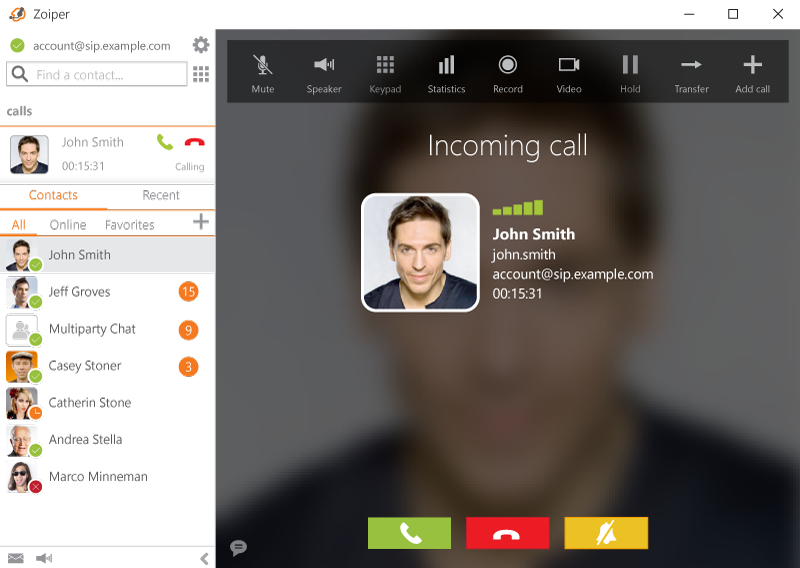
Zoiper is a SIP/IAX softphone — which means it uses internet-based protocols to connect to a VoIP provider.
Zoiper is just the app. Without a VoIP provider, you’re left with a pretty dial pad that can’t connect to the phone network.
Not all VoIP companies are created equal. If you’re pairing with Zoiper, you need a provider that ticks certain boxes:
At Plexatalk, we’ve designed our service to work seamlessly with Zoiper while staying affordable and flexible.
Choose from:
Unlike global VoIP brands, we offer local support. If you get stuck with codecs, registrations, or settings, we’ll guide you through.
Plexatalk gives you:
Here’s where the combo shines:
When shopping for “Zoiper providers,” avoid:
Yes, Zoiper has a free version that works fine with Plexatalk. Premium unlocks extra codecs and features.
Yes — Zoiper is just an app. You need a provider like Plexatalk for numbers, SIP accounts, and minutes.
Yes. We provide 01, 02, 0330, and 0800 numbers that work perfectly with Zoiper.
You can register the same SIP account on multiple devices. Great if you want calls ringing on mobile and laptop.
Yes — for many businesses it’s all you need. You can always add a VoIP desk phone later if desired.
You can add more SIP accounts, numbers, or features as you grow. Plexatalk scales with you.
Yes, but always use strong SIP passwords. Plexatalk also offers secure transport (TLS/SRTP) for encrypted calls.
Zoiper is a brilliant softphone — but it’s only as powerful as the VoIP provider behind it.
With Plexatalk you get:
Get your Zoiper-ready SIP account today.
As an electrician, your business runs on trust. Customers need to know that when they call, you’ll answer — whether it’s a landlord with tenants in the dark, a shop whose lights have failed, or a family needing an emergency repair.
But here’s something often overlooked: your phone number is one of the first signals of professionalism that a customer sees.
And thanks to VoIP technology, you don’t even need a physical line anymore. A virtual landline can route calls straight to your mobile while presenting your business with the professional image of a landline.
This blog explores why the choice between landline and mobile is more than just convenience — it’s about credibility, continuity, and the long-term success of your electrical business.
There’s no denying mobiles are convenient — most electricians couldn’t function without one. But when it comes to being the public face of your business, relying on just a mobile number creates issues that directly affect your reputation and growth.
Homeowners and commercial clients are cautious. With scams on the rise, many are wary of calling businesses that only advertise a mobile. A landline number conveys that you’re an established, professional service — not someone who might disappear tomorrow.
Imagine two electrician websites:
Customers almost always choose the electrician with a landline. Why? Because it looks safer and more credible. The difference is psychological, but powerful: a landline suggests you’ve invested in your business, while a mobile looks temporary or casual.
If you’re in the middle of wiring a fuse board or working at height, it’s easy to miss a mobile call. And in this trade, if you don’t pick up, the customer usually rings the next electrician they find on Google.
Mobiles work fine for sole traders — until you grow. Once you hire apprentices, office support, or extra electricians, a mobile-only setup becomes messy. A professional landline system scales with you.
Having a landline number is about more than technology — it’s about perception, trust, and continuity.
On your website, van livery, business cards, flyers, and Google profile, a landline simply looks more professional than a mobile.
Landlords, letting agents, and businesses want to feel they’re dealing with a credible, established provider. A landline number helps position you as a contractor they can trust with repeat work.
Traditional copper-wire landlines are being phased out in the UK (BT plans to switch off the PSTN by 2025). Businesses still tied to physical lines will have to migrate.
A virtual landline (VoIP) is future-proof — your number stays with you forever, even if you:
Continuity matters: once customers have your number, you never want to risk losing it.
Historically, getting a landline meant a BT engineer visit, wiring, and being tied to a physical location. Today, with VoIP (Voice over Internet Protocol), you can have a virtual landline that works wherever you do.
Customers see a landline. You get the flexibility of mobile.
A virtual landline isn’t just a smarter-looking number — it comes with business-grade features that solve real problems electricians face:
Not all numbers are created equal. Choosing the right type can help you win more jobs:
Each can be set up virtually via Plexatalk — routed to your mobile, your office, or both.
Picture this:
That one missed call could have been a contract worth thousands.
With a virtual landline, you can:
At Plexatalk, we make it straightforward:
Already exploring phone systems for electricians? Take a look at our dedicated electricians page
In a trade where customers want reassurance, your phone number is more than digits — it’s a signal of credibility.
Don’t let your number hold back your business. Power up your professional image today with a virtual landline from Plexatalk or landlinecloud.co.uk
Not legally, but from a customer perspective it makes a huge difference. A landline number signals professionalism and stability, which helps you win trust faster than advertising a mobile alone.
Yes — that’s exactly how most electricians use them. You get the credibility of a landline number on your website and van, but calls ring straight through to your mobile so you never miss work while on the go.
Unlike traditional copper landlines, a virtual landline (VoIP) isn’t tied to an address. You keep the same number whether you move office, change mobile provider, or expand into a new area.
A local number (like 0161 for Manchester or 020 for London) reassures homeowners and local businesses you’re nearby.
A 0330 number is non-geographic, making you look like a national provider — great if you want to appeal beyond your area.
An 0800 freephone tells customers you’re serious about service and covering the cost of the call.
Not at all. VoIP numbers are usually cheaper than traditional landlines and give you access to features like voicemail, call routing, and IVRs without extra cost.
Yes — in fact, the best setup is a virtual landline plus mobile. Customers call the professional landline number, and you answer on your mobile (or a desk phone if you’ve got office staff). It’s the best of both worlds.
No — to them, it looks exactly like a normal landline. Whether you choose a local code, 0330, or 0800, your business presents the same professional image.
With Plexatalk you can add IVR menus, custom voicemail, call routing, hunt groups, out-of-hours handling, and even call tracking for marketing campaigns. All things a standard mobile can’t do.
The plumbing industry runs on three things: trust, speed, and professionalism. When a customer has a burst pipe or a faulty boiler, they don’t have time to hesitate — they’ll call the number that looks most reliable and responsive.
Traditionally, many plumbers advertise their personal mobile number. It’s convenient, but is it really the best way to present your business? A mobile number can sometimes give off the impression of a one-person outfit that may or may not pick up the phone during working hours. For customers seeking reassurance, that’s a risk.
This is where the virtual landline comes in. Designed for businesses, it blends the credibility of a landline with the flexibility of a mobile. The result? A professional image, smoother call handling, and a setup that works around your business — not the other way around.

For many plumbers, the mobile phone is the obvious choice. It’s in your pocket, it’s easy to use, and you don’t need any extra setup. But while mobiles are convenient, they’re not always the best fit for a growing trade business.
In a competitive trade like plumbing, first impressions really matter — and your phone number is often the very first thing a customer sees. A landline instantly communicates stability and professionalism, helping you stand out from competitors who rely solely on mobiles.
A landline suggests you’re an established business with a proper base of operations. Customers feel reassured that you’re not just “here today, gone tomorrow.”
If you’re targeting work in a specific area, a geographic landline number (e.g., 020 for London, 0161 for Manchester) makes you look like the go-to plumber in that community. People instinctively trust local businesses.
Want to position yourself as more than a local sole trader? Non-geographic numbers (like 0333) project a nationwide presence, giving you the appearance of a larger, more professional outfit.
Competitive Edge
Given the choice, customers are far more likely to call a plumber advertising a landline number than one showing only a mobile. It’s a small detail that gives you a big advantage.
A virtual landline gives you all the professional advantages of a landline number, but with none of the restrictions of being tied to a desk. Instead, it’s powered by VoIP (Voice over Internet Protocol) — the same reliable technology behind modern business phone systems. The result? Simple, flexible, and cost-effective communication built for trade businesses.
Your virtual landline can be forwarded straight to your mobile. That means customers dial what looks like a professional landline, but you can answer on the go — whether you’re driving between jobs or fixing a boiler.
If you expand and bring on staff, you can set up proper desk phones or office handsets linked to the same number. Calls can be shared, routed, or transferred, just like a traditional office system.
Unlike a personal mobile, a virtual landline grows with you. Adding new numbers, new staff, or new call-handling features is quick and easy — no need to juggle multiple mobiles or worry about missed calls.
In short, you get the credibility of a landline, the convenience of a mobile, and the scalability of a full phone system — all in one.
The days of traditional copper landlines are numbered. In fact, the UK is in the process of phasing them out completely, with a nationwide switch-off scheduled by 2025. That means new copper lines aren’t being installed, and existing ones will soon stop working.
A virtual number (VoIP number) gives you the same credibility as a landline, but without being tied to old, outdated infrastructure. Instead, calls are delivered over the internet — more reliable, more flexible, and ready for the future.
By making the move now, you avoid being caught out when copper lines go dark. You’ll also benefit straight away from modern features that a traditional landline simply can’t offer, like call routing, voicemail to email, and mobile forwarding.
A virtual landline isn’t just a smarter number — it comes packed with business-grade features that make everyday communication more professional and more efficient. For plumbers, that can be the difference between winning a job or losing it to a competitor.
No more “Hi, it’s Dave” messages. Instead, set up a branded voicemail that reassures callers they’ve reached your plumbing business, not a personal mobile.
Give customers clear options from the start: “Press 1 for emergencies, 2 for quotes.” It keeps urgent calls prioritised while still capturing new business.
Busy on a job? Calls can automatically redirect to a teammate, an office assistant, or even a call-answering service — so customers never hit a dead end.
Need to share the load? Set multiple phones to ring at once, so whoever is free can answer first. It’s teamwork made simple.
Protect your evenings and weekends without looking unprofessional. After-hours calls can go straight to voicemail, a call service, or a dedicated “non-emergency” line.
Together, these features give your plumbing business the polish of a larger operation, while keeping the flexibility you need on the go.
Switching to a virtual landline couldn’t be easier. With Plexatalk, you can choose the setup that works best for you:
Head to landlinecloud.co.uk – our platform for Virtual Landlines.
Want a fully managed approach? Our team will:
Either way, you’ll be giving your plumbing business the credibility of a landline, the flexibility of a mobile, and the tools of a full business phone system — all at a fraction of the cost of traditional setups.
Ready to stop losing calls and start winning more jobs? Get your Plexatalk virtual landline today or call today on 0330 057 6699 to get started.
A virtual landline is a business phone number that looks like a standard landline but runs over the internet (VoIP). Customers see a professional number, while you answer calls on your mobile, desk phone, or computer.
Not at all. You can start by simply forwarding calls to your mobile. If you want, you can add desk phones or softphones later — but it’s not required.
Yes. If you already advertise a landline, Plexatalk can port your existing number across so you don’t lose it.
You’ll have business-grade voicemail with custom greetings, and you can also set up call routing or hunt groups so someone else can answer.
Yes. By 2025, the UK is retiring traditional copper phone lines. A virtual landline future-proofs your business so you’re not caught out.
With Plexatalk, you can be live within minutes via self-serve, or our team can set everything up for you.
By January 2027, the UK’s traditional landline network—the Public Switched Telephone Network (PSTN)—will be switched off permanently. This marks the end of copper phone lines that have carried the nation’s calls for decades. For millions of households and businesses still relying on these old connections, the clock is ticking: you’ll need to move to a digital alternative before the cutoff.
If you haven’t already switched, expect to start receiving letters or emails from your broadband provider about “Digital Voice” services or VoIP (Voice over Internet Protocol).
But there’s no need to panic. The changeover doesn’t have to be complicated, and with the right preparation it can actually make your phone service more reliable, more flexible, and in some cases even cheaper.
In this guide, we’ll walk you through:
Whether you’re a homeowner wanting a simple setup or a business looking for advanced features, this guide will help you make a smooth, stress-free transition into the UK’s all-digital future.
The UK’s Public Switched Telephone Network (PSTN)—the copper-wire system that has powered landlines for decades—is being permanently retired. From now on, all calls will be delivered over digital, internet-based networks (IP/VoIP) instead.
The nationwide switch-off will take place in January 2027. While the original deadline was set for December 2025, the timeline has been extended to give households and businesses more time to adapt. Importantly, many areas have already entered “stop-sell” status, meaning no new traditional landline services can be ordered—and in some cases, existing ones cannot be modified.
The copper landline network is:
By moving everyone to VoIP (Voice over Internet Protocol), the UK will gain a simpler, more resilient communications infrastructure—while unlocking new features such as multi-device calling, better integration with broadband, and improved reliability.
Anyone still using a traditional landline connection will be impacted. This includes:
In short: if your phone plugs into the wall rather than your router, you’ll need to switch.
VoIP (Voice over Internet Protocol) is the technology that replaces traditional landlines. Instead of running over copper wires, your phone calls are transmitted through your broadband internet connection. If you’ve ever used services like Zoom, WhatsApp, or Skype, you’ve already experienced VoIP in action—only now, it’s becoming the standard for all UK landlines.
The UK landline switch-off is coming — but moving to digital doesn’t need to be complicated. At Plexatalk, we make the transition smooth, reliable, and stress-free. Here’s how the process works:
VoIP runs over your internet connection, so you’ll need a stable service.
We provide flexible VoIP packages for homes and businesses. With Plexatalk, you’ll benefit from:
Call us on 0330 057 66 99 or email support@plexatalk.co.uk
We know how important it can be to hold on to a familiar phone number — whether it’s a number your family has used for decades or a business contact line your customers already know. The good news is: you don’t have to lose it when you switch to VoIP.
UK regulator Ofcom requires all providers to support number portability, which means you can transfer (“port”) your old landline number onto your new VoIP service with Plexatalk.
To avoid delays, follow these simple steps:
At Plexatalk, we manage the process for you from start to finish, so keeping your number is simple and stress-free.
Ready to switch? Call us on 0330 057 66 99 or email support@plexatalk.co.uk
Switching to VoIP doesn’t always mean buying lots of new kit — in many cases, you can keep your existing phone. Here’s what you might need, depending on your setup:
At Plexatalk, we can supply:
We don’t provide routers or UPS units, but we’ll happily advise you on the best options for your setup.
To discuss the right equipment for your home or business, call 0330 057 66 99 or email support@plexatalk.co.uk
For most households and businesses, yes — VoIP is more cost-effective than a traditional landline.
By moving to VoIP, many households and organisations actually save money by dropping line rental while gaining more flexibility and features.
One of the biggest questions people ask about VoIP is: “What happens in a power cut?”
With the old copper network, landlines worked independently of mains electricity. VoIP is different — it relies on your broadband router and an internet connection, both of which need power to function.
There are reliable solutions to keep you connected:
At Plexatalk, we:
With the right setup, VoIP can be just as reliable as your old landline — and much more flexible.
📞 For tailored advice, call 0330 057 66 99 or email support@plexatalk.co.uk
As the UK prepares for the landline switch-off, there are plenty of VoIP providers out there — but not all are created equal. Many households will be automatically moved to big-brand services like BT Digital Voice or Vodafone’s VoIP add-ons, while businesses may be pushed toward complex corporate platforms.
At Plexatalk, we do things differently. We combine the reliability of enterprise-grade VoIP with the personal support and fair pricing that the big players can’t match.
Switching to VoIP is usually straightforward — but like any technology, things don’t always go perfectly the first time. Here are some of the most common issues and how to solve them.
💡 Need help? At Plexatalk, our support team is here to get you back up and running quickly.
📞 Call 0330 057 66 99 or email support@plexatalk.co.uk
The process is simple:
Check you have a stable broadband connection.
Choose a VoIP provider (like Plexatalk).
Decide whether to keep your current handset (with an adapter) or upgrade to a VoIP phone.
Request number porting so you keep your landline number.
Plug in your equipment, test, and then cancel your old landline.
👉 Plexatalk handles the whole process for you — just call 0330 057 66 99.
Usually 7–14 days, depending on number porting. With Plexatalk, setup can be as quick as the same day if you’re taking a new number.
Not really. A single call needs as little as 0.5 Mbps, but for a busy household or business we recommend 10 Mbps+ for smooth performance.
Yes. With a simple ATA adapter (we can supply for £50), most existing handsets work with VoIP. Plexatalk supplies both adapters and dedicated VoIP phones.
Yes. Traditional line rental costs £15–20 per month, while VoIP often starts at £5–10 per month, with unlimited UK calls included. Businesses benefit even more with advanced features at lower costs.
VoIP depends on your router and power. Ofcom requires providers to offer battery backup (often free for vulnerable users). You can also use your mobile phone as an emergency backup.
Some older devices aren’t compatible. Always check with your device provider. Plexatalk can advise on upgrades for telecare, alarm, and security systems.
Yes — just request number porting during setup. Plexatalk handles this from start to finish so you don’t lose your existing number.
Yes. With a stable broadband connection, VoIP is as reliable as (and often clearer than) the old landline. Many businesses rely on it every day for critical communications.
When provided by a trusted UK provider like Plexatalk, yes. We use encrypted connections and advise customers on keeping routers and systems up to date for maximum security.
You’ll need:
A broadband router
Either an ATA adapter (to use your old phone) or a VoIP handset
Optional: battery backup for power cuts
Plexatalk supplies adapters and VoIP phones to make setup simple.
Ready to switch your landline to VoIP?
Call 0330 057 66 99 or email support@plexatalk.co.uk
The landline switch-off affects everyone — but it’s especially important to prepare if you or a family member is elderly, vulnerable, or rely on telecare/medical devices.
Ofcom requires all providers to:
📞 Concerned about a vulnerable relative? Call 0330 057 66 99 or email support@plexatalk.co.uk
By January 2027, the UK’s PSTN landline network will be gone for good. From that point forward, every household and business will rely on digital voice services (VoIP) or mobile phones for calling.
The end of copper landlines isn’t just about replacing old technology — it’s about opening the door to new possibilities:
The traditional landline as we knew it — powered by copper wires — will no longer exist. Instead, landline calling will be fully digital, offering clearer quality, lower costs, and far more flexibility.
At Plexatalk, we don’t just help you get through the 2027 switch-off — we prepare you for the future:
📞 Ready to future-proof your phone service? Call 0330 057 66 99 or email support@plexatalk.co.uk
The landline switch-off is inevitable — but leaving it to the last minute could cause unnecessary stress. By starting the process now, you’ll avoid disruption and make sure your home or business is ready well before January 2027.
With Plexatalk, moving from landline to VoIP is straightforward:
The sooner you switch, the smoother the transition will be.
📞 Call 0330 057 66 99 or 📧 email support@plexatalk.co.uk
At Plexatalk, we’re here to make your switch from landline to VoIP simple and stress-free. But if you’d like to read more about the UK landline switch-off from official sources, here are some useful links:
Wondering how to Keep Your Landline When Switching to Cuckoo Full Fibre? Switching to Cuckoo Full Fibre is one of the smartest moves you can make if you want fast, reliable, future-proof broadband. Cuckoo keeps things simple: one fast package, one fair price, no mid-contract price hikes, and the reassurance that you’re getting speeds designed for the modern internet.
With fibre-to-the-premises (FTTP) now rolling out across the UK, many households and businesses are leaving behind the old copper lines that held back their broadband for years. With speeds of up to 900 Mbps and none of the signal drop-outs caused by distance from the cabinet, Cuckoo’s network is designed for streaming, video calls, gaming, cloud storage, and smart home devices — all working at once without slowdowns.
But there’s a question that often gets overlooked:
What happens to your landline when you switch to Cuckoo?
The answer might surprise you.

Unlike traditional broadband services that bundled internet and phone lines together, Cuckoo Full Fibre doesn’t include a landline at all.
That means:
Cuckoo’s philosophy is clear: focus on broadband, drop the extras. That keeps things simple and cuts out unnecessary line rental charges.
But what if you’ve had the same phone number for 10, 20, or even 30 years? What if it’s tied to your business, your security alarm, or the only way elderly relatives reach you?
If you cancel your old package without making a plan, you’ll lose your number permanently.
A lot of people assume landlines are “dying out.” It’s true fewer people pick up the home phone to call family now — mobiles and messaging apps dominate — but there are still plenty of reasons a fixed phone number remains useful.
So even in the fibre age, landlines still play a role — especially when backed by VoIP.
The UK’s Public Switched Telephone Network (PSTN) — the copper-based system that powered every landline call for decades — will be switched off in January 2027.
That means:
In short: every landline in the UK is moving to the internet. Switching to Cuckoo Full Fibre puts you ahead of the curve, but it also means you’ll need to plan how to keep your number now.
VoIP (Voice over Internet Protocol) is the technology that lets you make and receive calls over broadband instead of copper wires.
Think of it like this: instead of your voice travelling through old telephone cables, it’s converted into digital signals and carried across your internet connection. To the caller, nothing changes — they still dial your familiar number.
With Plexatalk VoIP, you can:
And because Cuckoo Full Fibre is fast, stable, and low-latency, it provides the perfect backbone for crystal-clear VoIP calls without dropouts.
Choosing Plexatalk with Cuckoo Full Fibre gives you:
The key is to act before you cancel your old broadband + phone service.
Here’s how it works step-by-step:
If you don’t want to buy new handsets, that’s fine. With an Analogue Telephone Adapter (ATA), you can plug your old phone into your Cuckoo router and use it as normal.
Benefits:
For businesses or home offices, a dedicated VoIP desk phone can unlock extra features:
Perfect for:
Not everyone wants a physical phone. With VoIP apps like Zoiper:
This is especially popular for freelancers, remote workers, and anyone who travels often.
Case 1: Family in Cornwall
Moved to Cuckoo for faster fibre but needed their old BT landline for a telecare system. We ported their number, supplied an ATA, and confirmed compatibility with the alarm provider.
Case 2: Small Marketing Agency in Manchester
Cuckoo fibre gave them stable broadband for remote work. We set up three VoIP desk phones with hunt groups and voicemail-to-email so no client call is ever missed.
Case 3: Rural Couple in Shropshire
Poor mobile signal made their landline essential. We ported their number, added Zoiper on their mobiles, and now they can take calls anywhere on the property via Wi-Fi.
No. Cuckoo is broadband-only.
Yes, but not with Cuckoo. You’ll need a 3rd party VoIP provider like Plexatalk to handle calls.
Yes, with an ATA adapter and hosted VoIP account.
Yes — VoIP apps make it possible to answer calls on your mobile, tablet, or laptop.
Yes. Fibre-to-the-premises is one of the best networks for VoIP.
Your Plexatalk VoIP number isn’t tied to Cuckoo. It follows you to any provider.
One of the best things about VoIP is that it’s independent of your broadband provider. Unlike the old copper landlines that were tied directly to BT exchanges, your Plexatalk number is portable — it stays with you no matter how often you change internet providers.
That means if you move away from Cuckoo in the future, your landline will continue to work seamlessly. For example:
This flexibility gives you confidence to shop around for the best broadband deals without worrying about losing your long-held landline number.
Your VoIP line is yours for life — no matter who provides your internet connection.
Moving to Cuckoo Full Fibre gives you incredible internet speeds and a future-proof connection. With Plexatalk VoIP, you can keep your trusted landline number at the same time — no line rental, no hassle, and features that copper lines could never provide.
📞 Call us today on 0330 057 6699
📧 Email support@plexatalk.co.uk
Explore our Residential VoIP Packages or Business VoIP Solutions and see how easy it is to make the move.

It’s estimated that Pakistan comes into the top 10 destinations where international calls are made from the UK. Despite the relatively low price per minute in comparison to some other countries, a lot of carriers in the UK charge a lot to make calls to Pakistan.
Most UK mobile and landline providers charge excessive rates for international calls. Instead of paying up to £4.21 per minute, switch to Plexatalk—our VoIP service that includes minutes to Pakistan in your plan, saving you money on both personal and business calls.
The rates to Pakistan are so cheap, we include them in our inclusive minutes. You can check out our domestic pricing here and business pricing here.
This one can be a bit tricky as many providers offer deals that come and go, so this information will be up-to-date at the time we pubish it but it may be that bundles or plans come up. We’re going to go into the main UK mobile providers:
With these rates, a 10-minute call could cost up to £42 on EE—ridiculous! If you frequently call Pakistan from a mobile, it’s worth looking at alternative options.
The prices above don’t take into account bundles and plans.
Just like mobile providers, a lot of landline providers have bundles and deals too on international calls. Often they put different countries into different bands.
While these are lower than mobile rates, the costs still add up, and you’re limited to calling from a landline.
The prices above don’t take into account bundles and plans.
VoIP (Voice over Internet Protocol) lets you make calls over the internet rather than traditional phone lines. This means lower costs, better flexibility, and no per-minute rip-offs from big providers.
Unlike traditional mobile and landline services, we include calls to Pakistan in our allowances, so you don’t have to worry about per-minute charges. Whether you’re calling for personal or business reasons, we offer a much better deal than UK networks.
With PlexaTalk, you can:
You can check out our domestic pricing here and business pricing here.
Stop paying per-minute fees to call Pakistan. Join Plexatalk and make unlimited calls at a fraction of the cost.
| Provider | Rate (per minute) | Bundled Plans Available? |
|---|---|---|
| PlexaTalk (VoIP) | Included in plan | Yes (Unlimited Calls to Pakistan) |
| O2 | £2.24 | Yes (International Favourites) |
| Vodafone | £2.00 | Yes (International Call Bundles) |
| Three (3) | £2.50 | Yes (International Saver) |
| EE | £4.21 | Yes (International Add-ons) |
| BT (Landline) | 35.7p (Day) | Yes (BT International Plan) |
| TalkTalk (Landline) | 33p | Yes (International Extra) |
| Sky (Landline) | 29.90p (Day) | Yes (Sky Talk International) |
The first direct telephone service between the United Kingdom and Pakistan was inaugurated in June 1949, connecting London and Karachi. At that time, a three-minute call cost £3.
Prior to this, international telephone communication was limited and often required intermediary connections. The first official transatlantic telephone call occurred on January 7, 1927, between New York and London. You can check out our price comparison on calls to the US from UK here.
As for the specific date of the first telephone call between the UK and Pakistan, detailed records are scarce. However, it’s known that the direct service established in 1949 marked a significant milestone in UK-Pakistan telecommunications.
It’s worth noting that telephone services in British India, which included present-day Pakistan, were introduced as early as 1881. Major cities, including Karachi, had access to this technology.
After Pakistan’s independence in 1947, the country inherited approximately 14,000 landlines, indicating an existing, albeit limited, telecommunication infrastructure.
In summary, while the exact date of the first call between the UK and Pakistan isn’t well-documented, the establishment of direct telephone service in June 1949 was a pivotal moment in enhancing communication between the two nations.
The cost of calling Pakistan from a UK mobile depends on the network provider. As of now, O2 charges £2.24 per minute, Vodafone charges £2.00 per minute, Three (3) charges £2.50 per minute, and EE has the highest rate at £4.21 per minute. These rates can vary depending on international call bundles or special offers from providers.
Calling Pakistan from a UK landline is generally cheaper than calling from a mobile. BT’s standard rate is 35.7p per minute during the day and 31.3p per minute in the evenings and on weekends. TalkTalk charges 33p per minute, while Sky offers a slightly lower rate of 29.90p per minute during the day and 26.20p per minute in the evenings and on weekends. Some providers offer international calling plans that can reduce these costs.
The cheapest way to call Pakistan from the UK is through VoIP (Voice over Internet Protocol) services such as Plexatalk, which includes minutes to Pakistan in its plans. Other alternatives include using calling cards, purchasing international call bundles from mobile providers, or making calls via messaging apps like WhatsApp, Skype, or Viber, which use internet data instead of standard calling rates.
Yes, calling Pakistan using WhatsApp, Skype, or Viber is generally cheaper because these apps use internet data instead of mobile network call minutes. However, both the caller and recipient need to have the app installed and an internet connection. While these services are free over Wi-Fi, mobile data charges may apply if Wi-Fi is unavailable.
The only way to call Pakistan for free is by using internet-based calling apps like WhatsApp, Skype, or Viber. These services allow voice and video calls at no charge, but both parties must be connected to the internet. Some VoIP providers may offer free trial minutes for international calls, but completely free calls from traditional mobile or landline providers are not available.
Some UK mobile providers offer international call bundles that reduce the per-minute rate to Pakistan. O2 offers international calling add-ons through its International Favourites plan. EE provides international add-ons for discounted calls. Three (3) has an International Saver plan that lowers the cost of calling certain countries, including Pakistan. It is recommended to check with your network provider for current deals and bundle options.
VoIP (Voice over Internet Protocol) allows users to make phone calls over the internet instead of traditional phone lines, significantly lowering costs. VoIP services such as PlexaTalk provide international calling plans that include minutes to Pakistan at a fraction of the cost charged by UK mobile and landline providers. VoIP also offers better flexibility, as users can make calls through a desk phone, mobile app, or computer.
To set up a VoIP service for calling Pakistan, sign up with a provider like Plexatalk. The next step is to download a VoIP app like Zoiper or Linphone or use a VoIP desk phone. After setting up the internet connection, calls to Pakistan can be made at much lower rates compared to traditional mobile or landline services.
The first direct telephone call between the United Kingdom and Pakistan was made in June 1949 when a direct telephone service was established between London and Karachi. Before this, calls between the two countries required intermediary connections, making communication slow and expensive. In 1949, a three-minute call to Pakistan cost £3, which was considered a high amount at the time.
UK calling rates to Pakistan can be compared on mobile provider websites, VoIP service providers like PlexaTalk, and international calling card providers. Mobile networks such as O2, EE, Vodafone, and Three regularly update their international call rates, and VoIP services typically offer significantly lower prices with inclusive minutes. Checking multiple sources ensures you get the best deal for international calls.
Information above was taken from the providers websites at the time of writing but of course prices can change at any point.