
If you’re switching your home phone to VoIP, one of the most common questions is:
There’s a lot of mixed information online. Some phones are described as “VoIP compatible,” some routers have phone ports built in, and marketplaces don’t always explain the difference clearly. Today we’ll dive in and help you decide if you need a VoIP adapter.
This guide explains, in plain English:
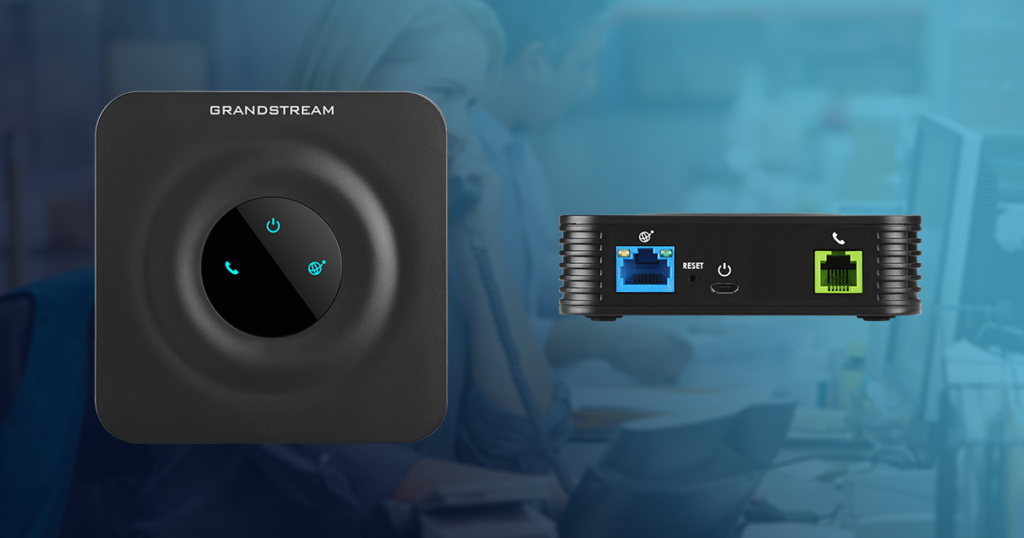
An ATA (Analogue Telephone Adapter) is a small powered device that allows a traditional landline phone to work with a VoIP service.
Your existing home phone is analogue.
VoIP calls travel over the internet as digital data.
An ATA converts:
Think of it as a translator between your old-style phone and modern internet calling.
This is important.
An ATA is not:
It is a powered electronic device that connects to:
If it isn’t powered on, your phone will not work.
You may see standard home phones described as “VoIP compatible.”
In most cases, this simply means:
They can be used with VoIP — if you have an ATA.
A standard phone with a BT plug or that connects to a wall phone socket is still an analogue phone. It cannot plug directly into your router and work on its own.
If a phone:
It is not a true VoIP phone.
A genuine VoIP (IP) phone:
Examples include desk phones from Yealink and cordless systems from Gigaset (when used with a SIP-compatible base station).
These do not require an ATA because they already speak “internet language.”
Many modern routers now include a phone socket. This causes a lot of confusion.
Major UK providers such as BT, Sky and Virgin Media often supply routers with a built-in phone port for their own “Digital Voice” services.
However:
So even if your router has a phone socket, it does not automatically mean you can use it with any VoIP provider.
With most major UK broadband brands, third-party SIP accounts are not supported on their supplied routers.
You will need an ATA if:
You do not need an ATA if:
You need an adapter if:
You don’t need an adapter if:
If you buy a generic ATA online, you would normally need to:
For non-technical users, this can be confusing and time-consuming.
If you get an adapter from us, it comes:
Simply connect it to your router and plug in your phone — it’s ready to go.
Switching from a traditional landline to VoIP doesn’t have to be complicated.
Most people can keep their existing phones — they just need the correct equipment.
The key points to remember:
If you’re unsure, check your phone against the quick guide above or contact us and we’ll confirm what you need before you order.
We’re here to make the switch simple.
Want to avoid the hassle of selecting a VoIP phone or adapter, sign up for our residential VoIP service today and we can supply a pre-configured adapter for £50 or get in touch to find out more about phones and adapters available for business.
If your phone has a BT plug or normally connects to a wall phone socket, then yes — you will need a VoIP adapter (ATA) to use it with an internet-based phone service.
If your phone connects directly to your router using a network cable and supports SIP settings, you do not need an adapter.
In most cases, no.
Standard analogue phones cannot plug directly into a router and work on their own. They require either:
A VoIP adapter (ATA), or
A broadband router that supports and allows third-party SIP configuration
Most major broadband providers do not allow third-party VoIP accounts on their supplied routers.
Not necessarily.
Many routers from providers like BT, Sky and Virgin Media include a phone port for their own digital voice services.
These ports are usually:
Locked to the provider’s own service
Not configurable with third-party SIP details
Inactive unless their voice package is enabled
If you are using an independent VoIP provider, you will typically still need an ATA.
An ATA allows you to use a traditional analogue phone with a VoIP service.
A VoIP phone (also called an IP phone):
Connects directly to your router
Has SIP account settings built in
Does not use a BT plug
VoIP phones do not require an adapter.
Not always.
Many standard home phones are described as “VoIP compatible” simply because they can be used with an ATA.
If the phone:
Has a BT plug
Does not have an Ethernet port
Has no SIP configuration menu
It is still an analogue phone and will require an adapter.
Accessing your voicemail on Plexatalk is quick and simple. Whether you are a residential user or a business customer using a multi-user VoIP system, the instructions below will help you access your messages easily.
To access your Plexatalk voicemail:
Once logged in, you will be guided through the voicemail menu where you can listen to messages, delete them, or manage your voicemail settings.
If you are a business customer using a multi-user VoIP system, voicemail PINs are usually assigned per user or extension.
This is especially important in shared office or call-handling environments.
Some VoIP desk phones can be configured to access voicemail without manually dialling *97.
For example, many Yealink VoIP phones support:
Your VoIP phone can be set up so that:
This configuration is typically handled by your VoIP provider, IT administrator, or via remote phone provisioning. If you are unsure whether your phone supports this feature, Plexatalk can advise.
If you require assistance accessing voicemail or configuring your VoIP phones, Plexatalk support will be able to help.